Smarter Tools for KDP Publishers

Capture data | Track performance | Analyze trends
Make smarter publishing decisions

Tools Built for Amazon KDP Publishers

Lightweight Chrome extensions that run directly on Amazon book pages
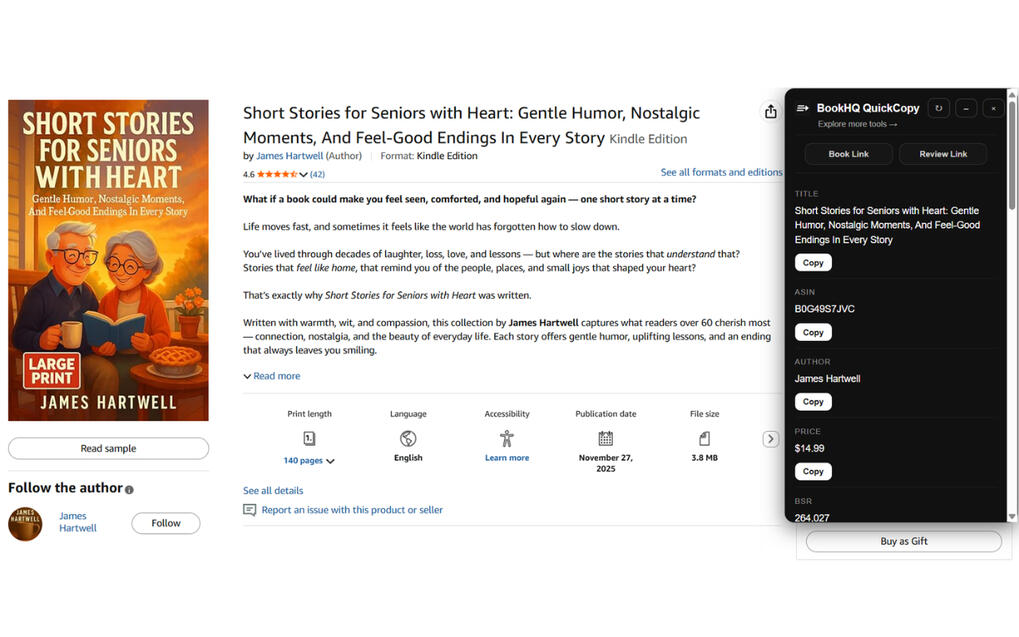
QuickCopy

[Free Download]

A fast, lightweight tool for extracting key Amazon book listing data in seconds

✔ Copy title, author, and ASIN instantly
✔ Extract clean, formatted descriptions
✔ Ready-to-use output
✔ Save time on research

Library

[Free plan available | Upgrade anytime]

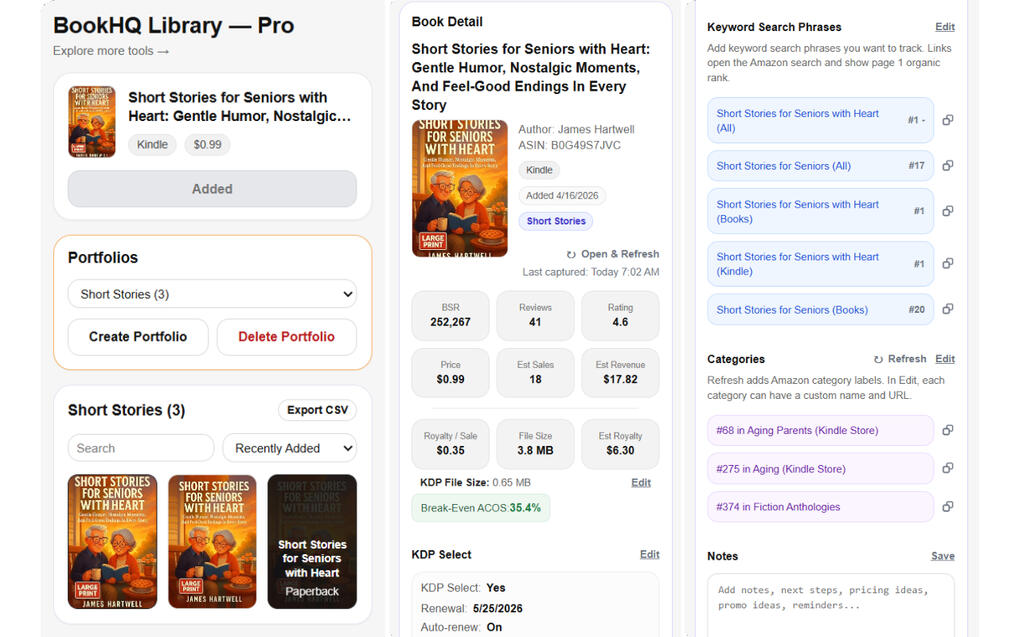
Manage your KDP books, keywords, and workflows in one place

✔ Manage your KDP books in one place
✔ Monitor KWs and categories with ease
✔ Track notes, updates, and next actions
✔ Your hub for managing KDP books


ASIN Watchlist

[Free plan available | Upgrade anytime]

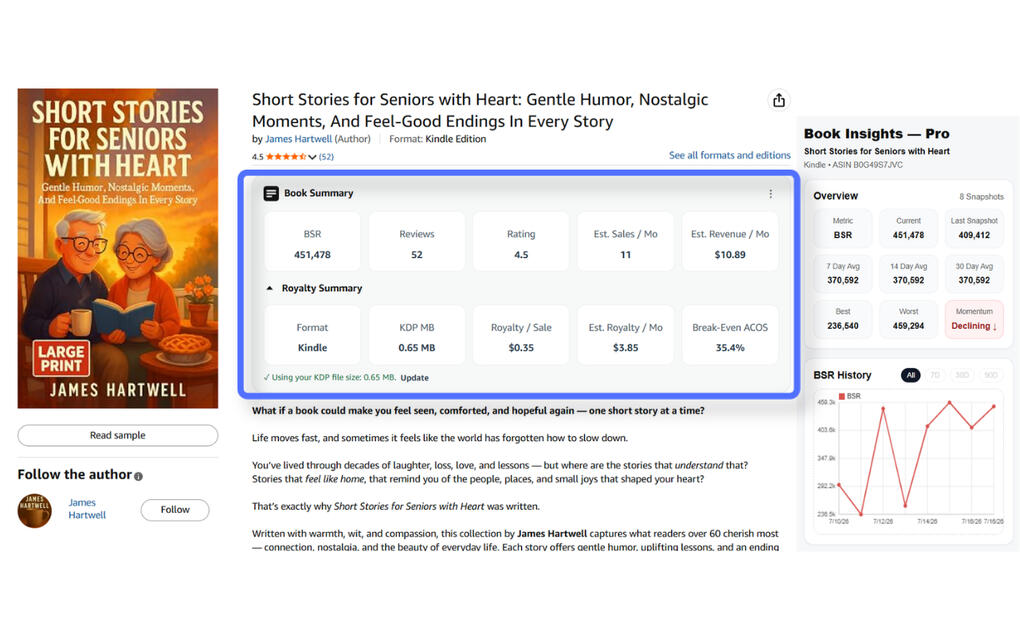
Track Amazon book performance over time with powerful insights and historical data
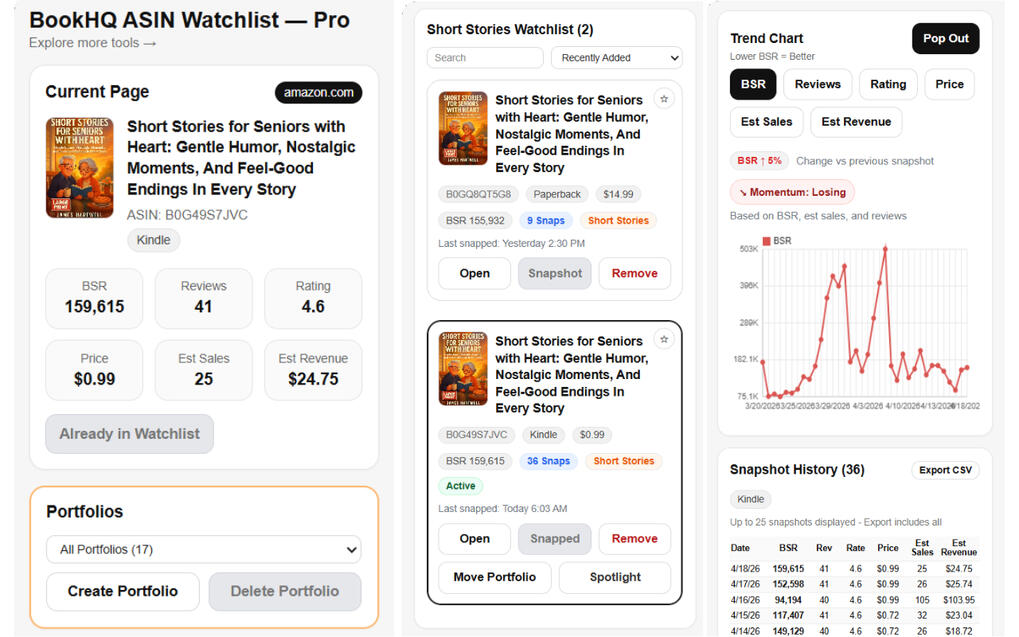
✔ Track BSR trends over time
✔ Capture daily performance snapshots
✔ Organize books into portfolios
✔ Monitor growth & ranking movement
FAQ

After checkout, install and open the BookHQ Chrome extension, then sign in using the same email you used to purchase. Your Pro access will unlock automatically.
Billing is handled securely through Stripe. You can update payment details, switch plans, or cancel anytime from your BookHQ account page.
Your Pro access will remain active until the end of your current billing period.
Upgrades take effect immediately. Downgrades take effect at the end of your current billing period.
Your subscription and sign-in status are managed securely online, but your watchlist and snapshot data are stored locally in your browser.
No. BookHQ uses secure magic-link sign-in, so you can access your account using your email — no password required.
BookHQ works only on the Amazon book pages you visit. It does not automate actions or perform background scraping.
(function () { const items = document.querySelectorAll("#bookhq-faq .faq-item"); items.forEach((item) => { const btn = item.querySelector(".faq-question"); btn.addEventListener("click", () => { const isActive = item.classList.contains("active"); items.forEach((other) => other.classList.remove("active")); if (!isActive) { item.classList.add("active"); } }); }); })();

QuickCopy

Copy Amazon book data in seconds


✔ Copy title, author, and ASIN instantly
✔ Extract clean, formatted descriptions
✔ Ready-to-use output
✔ Save time on research and setup

Free | No signup | Works on Amazon pages
QuickCopy

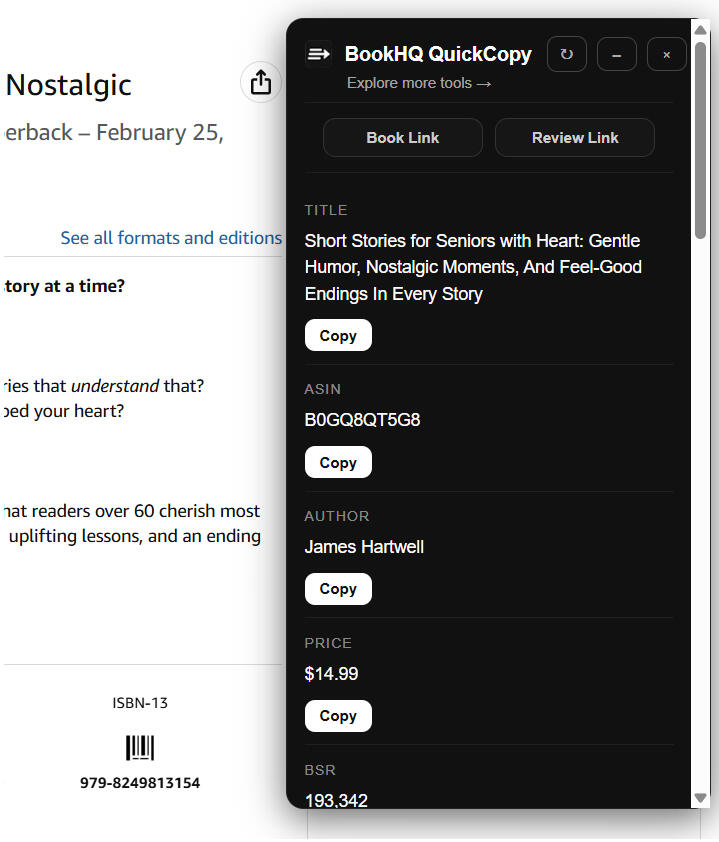
Instantly extract key Amazon book data

Free


✔ Copy title, author, and ASIN instantly
✔ Extract clean, formatted descriptions
✔ Ready-to-use output
✔ Save time on research and setup

ASIN Watchlist

Track Amazon book performance & identify winning opportunities

Free


✔ Track BSR trends over time
✔ Capture daily performance snapshots
✔ Organize books into portfolios
✔ Identify top-performing opportunities
✔ Monitor growth & ranking movement


✔ Limited watchlist
✔ Limited snapshots
✔ Basic tracking

ASIN Watchlist Pro

Unlock full tracking, deeper insights, and unlimited growth visibility

$9/month

or

$79/year


✔ Unlimited snapshots
✔ Unlimited watchlist
✔ Full historical insights
✔ Portfolio tracking

Cancel anytime | No risk
Library Pro

Unlock unlimited books, unlimited portfolios, and full export access

$9/month

or

$79/year


✔ Unlimited books
✔ Unlimited portfolios
✔ CSV export for full data control
✔ Built for serious KDP publishers

Cancel anytime | No risk

You're all set!

Pro access activated

Step 1 - Install your BookHQ Chrome Extension

Already installed? Skip to Step 2

Install and open the extension purchased to access your Pro features:


Step 2 - Sign in to Activate Pro

Sign in now to activate Pro in your extension.
We’ll send you a secure magic link — no password needed.

(function () { const SUPABASE_URL = "https://fmeuxpfdlnmaxdgcryzu.supabase.co"; const SUPABASE_ANON_KEY = "eyJhbGciOiJIUzI1NiIsInR5cCI6IkpXVCJ9.eyJpc3MiOiJzdXBhYmFzZSIsInJlZiI6ImZtZXV4cGZkbG5tYXhkZ2NyeXp1Iiwicm9sZSI6ImFub24iLCJpYXQiOjE3NzQ5NjM1MjksImV4cCI6MjA5MDUzOTUyOX0.VZsFhTCGmqZBFDjaUPzNElTpTHuO_UHcyA1H5n1iOrU"; const CHECK_USER_ACCESS_URL = "https://fmeuxpfdlnmaxdgcryzu.supabase.co/functions/v1/check-user-access"; const params = new URLSearchParams(window.location.search); const productKey = String(params.get("product") || "asin_watchlist").trim().toLowerCase(); function getAuthRedirectUrl() { return `https://auth.bookhq.tools/?product=${encodeURIComponent(productKey)}`; } const emailInput = document.getElementById("bookhqAuthEmail"); const sendBtn = document.getElementById("bookhqAuthSendBtn"); const msg = document.getElementById("bookhqAuthMessage"); function showMessage(text, isError) { msg.style.display = "block"; msg.textContent = text; msg.style.color = isError ? "#fca5a5" : "#ffffff"; } function setLoading(isLoading) { sendBtn.disabled = isLoading; sendBtn.style.opacity = isLoading ? "0.7" : "1"; sendBtn.style.cursor = isLoading ? "not-allowed" : "pointer"; sendBtn.textContent = isLoading ? "Sending Magic Link..." : "Sign In to BookHQ"; } function initAuth(client) { async function sendMagicLink() { const email = String(emailInput.value || "").trim().toLowerCase(); msg.style.display = "none"; if (!email) { showMessage("Enter your email first.", true); emailInput.focus(); return; } setLoading(true); try { const checkRes = await fetch(CHECK_USER_ACCESS_URL, { method: "POST", headers: { "Content-Type": "application/json" }, body: JSON.stringify({ email, product_key: productKey }) }); const checkData = await checkRes.json(); if (!checkData.exists || !checkData.hasAccess) { throw new Error("No active Pro account found for this email."); } const result = await client.auth.signInWithOtp({ email, options: { emailRedirectTo: getAuthRedirectUrl() } }); if (result.error) { throw result.error; } showMessage("Magic link sent. Open your email and click the link to continue.", false); } catch (err) { showMessage(err && err.message ? err.message : "Could not send magic link.", true); } finally { setLoading(false); } } sendBtn.addEventListener("click", sendMagicLink); emailInput.addEventListener("keydown", function (e) { if (e.key === "Enter") { e.preventDefault(); sendMagicLink(); } }); } function loadSupabaseAndInit() { if (window.supabase && typeof window.supabase.createClient === "function") { const client = window.supabase.createClient(SUPABASE_URL, SUPABASE_ANON_KEY); initAuth(client); return; } const script = document.createElement("script"); script.src = "https://cdn.jsdelivr.net/npm/@supabase/supabase-js@2"; script.async = true; script.onload = function () { try { const client = window.supabase.createClient(SUPABASE_URL, SUPABASE_ANON_KEY); initAuth(client); } catch (err) { showMessage("Could not initialize sign-in. Refresh the page and try again.", true); } }; script.onerror = function () { showMessage("Could not load sign-in tools. Refresh the page and try again.", true); }; document.head.appendChild(script); } loadSupabaseAndInit(); })();

Use the same email from checkout. Complete sign-in in the same browser/profile where your extension is installed.

Choose your BookHQ extension
Select the tool you want to sign in to or manage.
(function () { function normalizeProductKey(value) { const raw = String(value || "").trim().toLowerCase(); if (raw === "library") return "library"; if (raw === "asin_watchlist") return "asin_watchlist"; return ""; } function getProductLabel(productKey) { if (productKey === "library") return "Library"; if (productKey === "asin_watchlist") return "ASIN Watchlist"; return ""; } function getInitialProductKey() { const params = new URLSearchParams(window.location.search); const fromUrl = normalizeProductKey(params.get("product") || ""); if (fromUrl) return fromUrl; const fromStorage = normalizeProductKey(localStorage.getItem("bookhq_selected_product") || ""); return fromStorage; } function updateUrl(productKey) { const normalized = normalizeProductKey(productKey); const url = new URL(window.location.href); if (normalized) { url.searchParams.set("product", normalized); } else { url.searchParams.delete("product"); } url.hash = "account"; window.history.replaceState({}, "", url.toString()); } function updateUi(productKey) { const watchlistBtn = document.getElementById("bookhqToolWatchlistBtn"); const libraryBtn = document.getElementById("bookhqToolLibraryBtn"); const selectedText = document.getElementById("bookhqToolSelectedText"); const normalized = normalizeProductKey(productKey); const activeStyle = { background: "#ffffff", color: "#111111", borderColor: "#ffffff" }; const inactiveStyle = { background: "#111111", color: "#ffffff", borderColor: "#2f2f2f" }; function applyStyle(button, isActive) { if (!button) return; const styles = isActive ? activeStyle : inactiveStyle; button.style.background = styles.background; button.style.color = styles.color; button.style.borderColor = styles.borderColor; } applyStyle(watchlistBtn, normalized === "asin_watchlist"); applyStyle(libraryBtn, normalized === "library"); if (selectedText) { if (normalized) { selectedText.style.display = "block"; selectedText.textContent = "Selected tool: " + getProductLabel(normalized); } else { selectedText.style.display = "none"; selectedText.textContent = ""; } } } function setSelectedProductKey(productKey, options = {}) { const normalized = normalizeProductKey(productKey); const shouldUpdateUrl = options.updateUrl !== false; if (normalized) { localStorage.setItem("bookhq_selected_product", normalized); } else { localStorage.removeItem("bookhq_selected_product"); } window.BookHQSelectedProduct = normalized; updateUi(normalized); if (shouldUpdateUrl) { updateUrl(normalized); } } function getSelectedProductKey() { return normalizeProductKey(window.BookHQSelectedProduct || ""); } window.BookHQProductContext = { getSelectedProductKey, setSelectedProductKey }; const watchlistBtn = document.getElementById("bookhqToolWatchlistBtn"); const libraryBtn = document.getElementById("bookhqToolLibraryBtn"); if (watchlistBtn) { watchlistBtn.addEventListener("click", function () { setSelectedProductKey("asin_watchlist"); }); } if (libraryBtn) { libraryBtn.addEventListener("click", function () { setSelectedProductKey("library"); }); } setSelectedProductKey(getInitialProductKey(), { updateUrl: true }); })();

Sign In

Pro subscriber? Sign in with your email to unlock your paid features inside BookHQ tools.
We’ll send you a secure magic link — no password needed.

(function () { const SUPABASE_URL = "https://fmeuxpfdlnmaxdgcryzu.supabase.co"; const SUPABASE_ANON_KEY = "eyJhbGciOiJIUzI1NiIsInR5cCI6IkpXVCJ9.eyJpc3MiOiJzdXBhYmFzZSIsInJlZiI6ImZtZXV4cGZkbG5tYXhkZ2NyeXp1Iiwicm9sZSI6ImFub24iLCJpYXQiOjE3NzQ5NjM1MjksImV4cCI6MjA5MDUzOTUyOX0.VZsFhTCGmqZBFDjaUPzNElTpTHuO_UHcyA1H5n1iOrU"; const CHECK_USER_ACCESS_URL = "https://fmeuxpfdlnmaxdgcryzu.supabase.co/functions/v1/check-user-access"; const emailInput = document.getElementById("bookhqAccountAuthEmail"); const sendBtn = document.getElementById("bookhqAccountAuthSendBtn"); const msg = document.getElementById("bookhqAccountAuthMessage"); function getSelectedProductKey() { const selected = window.BookHQProductContext && typeof window.BookHQProductContext.getSelectedProductKey === "function" ? window.BookHQProductContext.getSelectedProductKey() : ""; return String(selected || "").trim().toLowerCase(); } function getAuthRedirectUrl(productKey) { return `https://auth.bookhq.tools/?product=${encodeURIComponent(productKey)}`; } function showMessage(text, isError) { msg.style.display = "block"; msg.textContent = text; msg.style.color = isError ? "#fca5a5" : "#ffffff"; } function setLoading(isLoading) { sendBtn.disabled = isLoading; sendBtn.style.opacity = isLoading ? "0.7" : "1"; sendBtn.style.cursor = isLoading ? "not-allowed" : "pointer"; sendBtn.textContent = isLoading ? "Sending Magic Link..." : "Sign In to BookHQ"; } function initAuth(client) { async function sendMagicLink() { const email = String(emailInput.value || "").trim().toLowerCase(); msg.style.display = "none"; if (!email) { showMessage("Enter your email first.", true); emailInput.focus(); return; } const selectedProductKey = getSelectedProductKey(); if (!selectedProductKey) { showMessage("Choose your BookHQ tool first.", true); return; } setLoading(true); try { const checkRes = await fetch(CHECK_USER_ACCESS_URL, { method: "POST", headers: { "Content-Type": "application/json" }, body: JSON.stringify({ email, product_key: selectedProductKey }) }); const checkData = await checkRes.json(); if (!checkData.exists || !checkData.hasAccess) { throw new Error("No active Pro account found for this email."); } const result = await client.auth.signInWithOtp({ email, options: { emailRedirectTo: getAuthRedirectUrl(selectedProductKey) } }); if (result.error) { throw result.error; } showMessage("Magic link sent. Open your email and click the link to continue.", false); } catch (err) { showMessage(err && err.message ? err.message : "Could not send magic link.", true); } finally { setLoading(false); } } sendBtn.addEventListener("click", sendMagicLink); emailInput.addEventListener("keydown", function (e) { if (e.key === "Enter") { e.preventDefault(); sendMagicLink(); } }); } function loadSupabaseAndInit() { if (window.supabase && typeof window.supabase.createClient === "function") { const client = window.supabase.createClient(SUPABASE_URL, SUPABASE_ANON_KEY); initAuth(client); return; } const script = document.createElement("script"); script.src = "https://cdn.jsdelivr.net/npm/@supabase/supabase-js@2"; script.async = true; script.onload = function () { try { const client = window.supabase.createClient(SUPABASE_URL, SUPABASE_ANON_KEY); initAuth(client); } catch (err) { showMessage("Could not initialize sign-in. Refresh the page and try again.", true); } }; script.onerror = function () { showMessage("Could not load sign-in tools. Refresh the page and try again.", true); }; document.head.appendChild(script); } loadSupabaseAndInit(); })();

Use the same email from checkout.
Complete sign-in in the same browser/profile where your extension is installed.


Manage Subscription

Already subscribed? Update billing, switch plans, or cancel you subscription.

(function () { const SUPABASE_URL = "https://fmeuxpfdlnmaxdgcryzu.supabase.co"; const SUPABASE_ANON_KEY = "eyJhbGciOiJIUzI1NiIsInR5cCI6IkpXVCJ9.eyJpc3MiOiJzdXBhYmFzZSIsInJlZiI6ImZtZXV4cGZkbG5tYXhkZ2NyeXp1Iiwicm9sZSI6ImFub24iLCJpYXQiOjE3NzQ5NjM1MjksImV4cCI6MjA5MDUzOTUyOX0.VZsFhTCGmqZBFDjaUPzNElTpTHuO_UHcyA1H5n1iOrU"; const CHECK_USER_ACCESS_URL = "https://fmeuxpfdlnmaxdgcryzu.supabase.co/functions/v1/check-user-access"; const emailInput = document.getElementById("bookhqBillingEmail"); const sendBtn = document.getElementById("bookhqBillingSendBtn"); const msg = document.getElementById("bookhqBillingMessage"); function getSelectedProductKey() { const selected = window.BookHQProductContext && typeof window.BookHQProductContext.getSelectedProductKey === "function" ? window.BookHQProductContext.getSelectedProductKey() : ""; return String(selected || "").trim().toLowerCase(); } function getBillingRedirectUrl(productKey) { return `https://auth.bookhq.tools/?mode=billing&product=${encodeURIComponent(productKey)}`; } function showMessage(text, isError) { msg.style.display = "block"; msg.textContent = text; msg.style.color = isError ? "#fca5a5" : "#ffffff"; } function setLoading(isLoading) { sendBtn.disabled = isLoading; sendBtn.style.opacity = isLoading ? "0.7" : "1"; sendBtn.style.cursor = isLoading ? "not-allowed" : "pointer"; sendBtn.textContent = isLoading ? "Sending Billing Link..." : "Manage Billing"; } function initBilling(client) { async function sendBillingLink() { const email = String(emailInput.value || "").trim().toLowerCase(); msg.style.display = "none"; if (!email) { showMessage("Enter your email first.", true); emailInput.focus(); return; } const selectedProductKey = getSelectedProductKey(); if (!selectedProductKey) { showMessage("Choose your BookHQ tool first.", true); return; } setLoading(true); try { const checkRes = await fetch(CHECK_USER_ACCESS_URL, { method: "POST", headers: { "Content-Type": "application/json" }, body: JSON.stringify({ email, product_key: selectedProductKey }) }); const checkData = await checkRes.json(); if (!checkData.exists || !checkData.hasBilling) { throw new Error("No billing account found for this email."); } const result = await client.auth.signInWithOtp({ email, options: { emailRedirectTo: getBillingRedirectUrl(selectedProductKey) } }); if (result.error) { throw result.error; } showMessage("Billing link sent. Open the newest email and click the link to continue.", false); } catch (err) { showMessage(err && err.message ? err.message : "Could not send billing link.", true); } finally { setLoading(false); } } sendBtn.addEventListener("click", sendBillingLink); emailInput.addEventListener("keydown", function (e) { if (e.key === "Enter") { e.preventDefault(); sendBillingLink(); } }); } function loadSupabaseAndInit() { if (window.supabase && typeof window.supabase.createClient === "function") { initBilling(window.supabase.createClient(SUPABASE_URL, SUPABASE_ANON_KEY)); return; } const script = document.createElement("script"); script.src = "https://cdn.jsdelivr.net/npm/@supabase/supabase-js@2"; script.async = true; script.onload = function () { try { initBilling(window.supabase.createClient(SUPABASE_URL, SUPABASE_ANON_KEY)); } catch (err) { showMessage("Could not initialize billing access. Refresh the page and try again.", true); } }; script.onerror = function () { showMessage("Could not load billing tools. Refresh the page and try again.", true); }; document.head.appendChild(script); } loadSupabaseAndInit(); })();

We’ll send a secure billing link to that inbox.

BookHQ Privacy Policy

Last updated: April 2026BookHQ provides tools to help Amazon KDP publishers analyze and manage book performance. This policy explains how data is handled across BookHQ extensions and services.


1. Data Collection

BookHQ does not collect, store, or transmit personal user data to external servers.All book tracking data, settings, and usage data are stored locally in the user’s browser using Chrome’s local storage.


2. Amazon Data

BookHQ accesses publicly available data from Amazon product pages (such as title, price, BSR, and reviews) to provide functionality.This data is:
- processed locally in the browser
- not linked to any personal identity
- not transmitted or stored externally


3. Account & Payments

For premium features, users may sign in using their email address via a secure magic link authentication system.Email addresses are used only for:
- account access
- verifying subscription status
Authentication is securely handled through Supabase.


4. Payments

Premium subscriptions are processed securely through Stripe.BookHQ:
- does not store or have access to payment details
- does not store credit card information


5. Data Sharing

BookHQ does not sell, share, or transfer user data to third parties.


6. Changes to This Policy

This policy may be updated from time to time. Updates will be reflected on this page with a revised date.


QuickCopyASIN Watchlist
DescriptionInstantly extract key Amazon
book data
Track Amazon book performance
and identify winning opportunities
PriceFreeFree
$9/month or $79/year
Key Features✔ Copy title, author, and ASIN instantly
✔ Extract clean, formatted descriptions
✔ Ready-to-use output
✔ Save time on research and setup
✔ Track BSR trends over time
✔ Capture daily performance snapshots
✔ Organize books into portfolios
✔ Identify top-performing opportunities
✔ Monitor growth & ranking movement
Linkplacehholder1placeholder2